顯示具有 Makerbot 標籤的文章。 顯示所有文章

2015年12月10日 星期四

快速成型專用的物理性修補機 PATCHING PHYSICAL OBJECTS/Stefanie Mueller


Design Team:
Alexander Teibrich, Stefanie Mueller, François Guimbretière,
Robert Kovacs, Stefan Neubert, and Patrick Baudisch

為了減少材料的消耗,並降低設計過程中反覆驗證所產生的廢料,德國設計師Stefanie Mueller 與其合作團隊提出了一種修補現有物件的方案(而不是再從零開始)。以下圖為例,(a) 首先軟體會計算哪些部分進行更改,然後 (b) 一個鑽頭會磨除不必要的幾何形體,緊接著列印出更新後的幾何造形。

image©Stefanie Mueller
個人化的製造流程目前是一個單向不可逆的過程;一旦物件以 3D 印表機製作完之後,便不能再做修改。任何的改變都需要從頭列印一個新的版本。這種操作的方法忽略了設計反覆檢視的特性(意味著後繼版本的設計其實僅是小部分的修改,其本質還是大部分繼承了之前的設計),這使得「從零開始製造」夾雜了許多不必要地浪費。
在本文中,設計師提出了不同的做法;不再是重新列印整個物件,而是針對現有物件進行檢查與修改。設計師重新改良了現有的 3D 印表機,透過構建一個嶄新的系統,來實現這樣一個想法。使用者將現有物件安置在 3D 印表機上,然後將原始模型以及修改後的模型,以 3D 的格式載入到設計的軟體,逆向演算如何進行物件的修改、修補。在系統查明哪些部分要刪除/添加哪些內容後,使用內置於印表機內的 3D 掃描器進行截取,而後標定好模型的坐標,小型銑床首先會刪除多餘的幾何部分,然後印表機的列印頭會堆疊列印新的幾何部分。
相較於整個物件的重製,設計師推出的新方法有效減少材料的消耗和塑膠廢物的生成(下面的範例分別保留原始物件 82% 和 93%)。

實際操作影片

2014年3月10日 星期一

ELT / 003_webcam mount for D-LINK + Replicator

Replicator 一代使用的 D-LINK 網路攝影機吊架
webcam mount for D-LINK + Replicator


前陣子架設了一組 D-LINK 2132L 雲端攝影機
來遠端監控 3d 印表機的列印狀態
關於 D-LINK 2132L


  • 支援 HD 1280 X 720P 解析度 
  • H.264 / MPEG4 / M-JPEG 影像壓縮格式 
  • 內建 IR 5m 紅外線夜視燈 
  • 內建 Micro SD 插槽 
  • 支援雙向語音功能

  • 網路攝影機由於需要不定期調整高低
    原本是安裝在相機腳架上(直覺)
    後來實在太好用,在採購第二組之後
    就變成下圖的德行
    最初被設計安裝在相機腳架上的 WebCam 版本
    original version / WebCam mounting on tripod


    2013年12月12日 星期四

    MakerBot MakerWare 2.4.1 釋出!

    原文出處:MakerBot
    MakerBot MakerWare 2.4.1|Release
    MakerBot MakerWare 2.4.1 釋出!


    最新版本的 MakerBot® MakerWare™ 2.4.1 版,日前開放供正式下載!這個版本提出了幾項重大的更新,特別針對自家可溶性材料(MakerBot® Dissolvable Filament)的部分,以及雙噴頭的機種(MakerBot® Replicator® 2X


    Created by: esheline
    Thingiverse: 145237


    重要更新 
    New Support Pattern
    最新版的 Makerware 針對[可溶性材料]提供了新的支撐列印樣式,可以產生特別強壯的支撐。 
    Higher Printing Temperature
    我們將可溶性材料的預設溫度提高了攝氏20度(230 > 250),讓它能附著在ABS材料上。 
    Dual Temperatures for Dual Extrusion 
    這次的版本提供了雙噴頭/雙溫度的設定,只需要在控制面板上簡單的設定各自的溫度。 

    Note: 
    Mac OS X users must uninstall 2.4.0 before installing 2.4.1. An erroneous version number in a 2.4.0 plist file causes 2.4.1 to crash on opening if installed directly over 2.4.0. 

    2013年7月1日 星期一

    3D 列印品質測試紀錄板

    檔案下載:http://www.thingiverse.com/thing:110948
    3D 列印品質測試紀錄板
    3D Printed Octopuses for quality test [ size=50mm ]


    3D Printing Quality Test 
    不論是在3D Printing或是數位製造的流程裡,設備環境的參數紀錄是一件非常非常重要的工作。這個作品目前僅提供MakerBot雙噴頭機型(相容機型)之ABS材料測試紀錄參考(之後會推出PLA版本),總共可以分成三個部分來看...
    (1)尺寸縮小的章魚,長寬為50mm

    (2)雙色列印的章魚A部分B部分,長寬為50mm

    (3)三色列印的底板A部分B部分,設定之記錄數據


    其中[切層高度]的測試是以 0.05mm 為級距
    包含[0.05、0.10、0.15、0.20、0.25、0.30]等,一共六種不同設定
    此外還有以 0.10 精細度製作的雙色列印版本
    主要的列印設定
    列印材質:ABS(黑/白/藍/紅),底板為PLA(白)
    切層軟體:MakerWare 2.2.1
    開啟 Raft 功能
    關閉 Support 功能
    填充率 infill = 15%
    薄殼數 number of shells = 2
    列印溫度 220/ 105(噴頭/加熱板)
    列印速度 40mm / 80mm(工作/移動)


    來建構自己屬於自己的版本吧!


    0.05mm
    01h06m
    0.10mm
    00h44m
    0.15mm
    00h32m
    0.20mm
    00h25m
    0.25mm
    00h23m
    0.30mm
    00h21m
    Dual 0.1
    01h52m

    2013年6月19日 星期三

    MakerBot Replicator Dual > Replicator 2 改裝紀錄_II

    這篇文章是上一篇[MakerBot Replicator Dual > Replicator 2 改裝紀錄_I]的延續


    [前文題要]
    這篇文章主要是紀錄 MakerBot 一代的 Replicator 雙噴頭機型
    可否以最簡單的方式,改裝成可以列印 PLA 材質,有風扇側吹的 R2 機型
    不管成敗,相信都有一些意義在。希望可以對有相關興趣的網友有所幫助


    [本文開始]
    首先,這個改裝的版本是針對筆者使用的機型(MakerBot Replicator 一代 Dual 的相容機型)特別量身訂做。由於牽扯到機器原始設計,韌體控制噴頭行徑,以及材料存在的誤差與形變等等因素,先小人後君子之不保證在任何狀態下都能使用,請各位自行斟酌後果自負。
    首先要了解的第一件事,這個改裝的實際效益是甚麼。
    請參考以下兩篇文章:
    (1)保持列印物冷卻的實驗 MAY 8, 2013
    (2)ABS 列印與側吹風扇之影響 MAY 22, 2013
    如果對於 ABS 的列印品質有所不滿,可以透過這款升級,得到些微的提升。但是強烈建議,這些操作的環境是建構在密閉機箱的前提下。機箱如果沒有保持密閉的狀態運作,這樣的改裝只是杯水車薪。


    [物件準備]
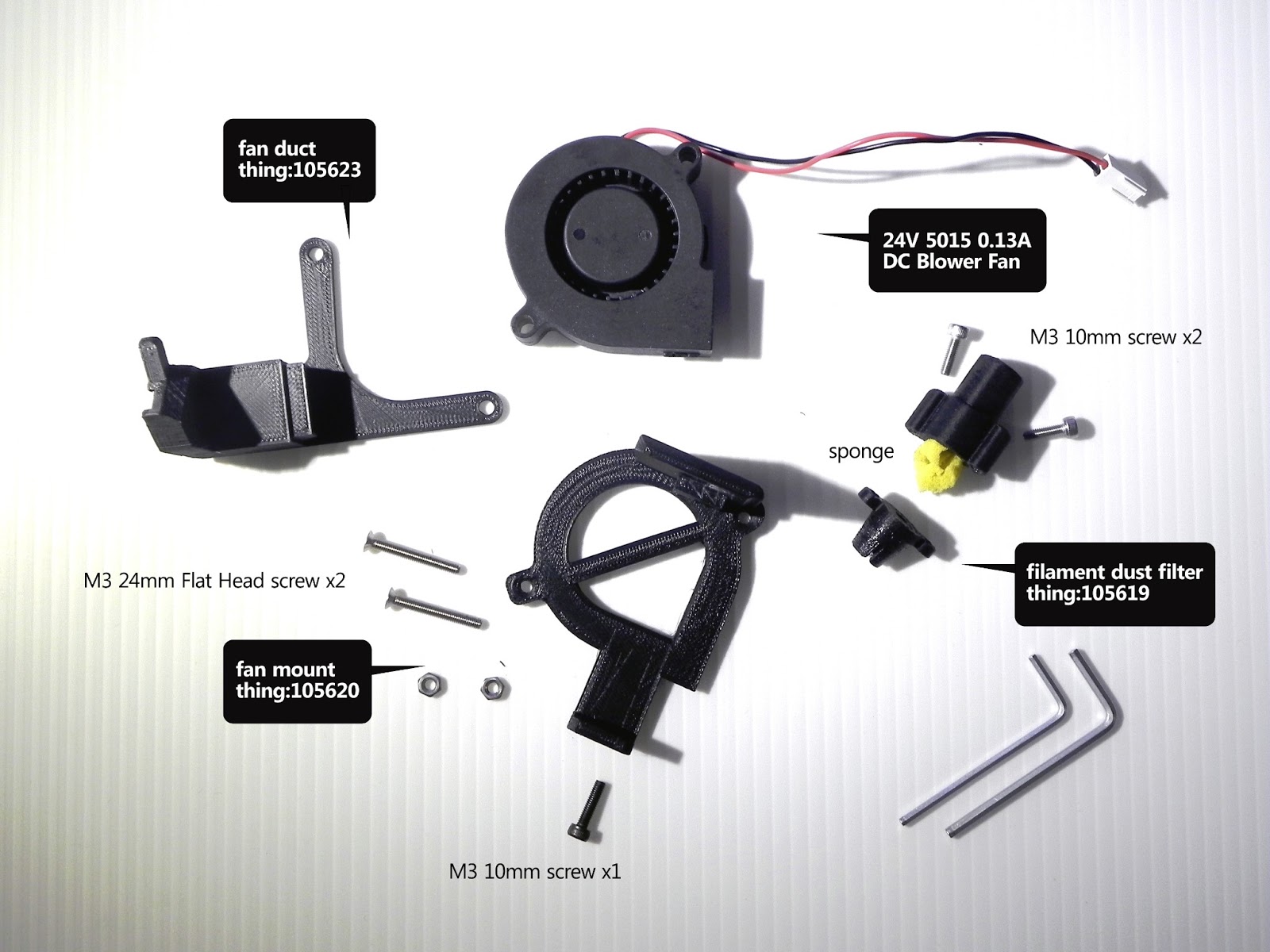
    其次是準備改裝所需的物件,一共包含一個鼓風機,一個6P的切換器,以及三組要預先列印的構件。 


    (A) 24V 5015B 0.1A 鼓風機
    24V  5015B  0.13A  DC blower fan
    改裝 R2 所使用的風扇部分,我是購買相似規格(淘寶連結
    代表的是 24V 尺寸 50 x 50 x 15mm B是滾珠軸承

    原因無它,由於這個額外的風扇是吃 DUAL / R2X 右噴頭的風扇電力
    所以風扇應該是沿用原本右噴頭風扇的規格
    滾珠軸承的好處是,壽命長,較油封軸承耐髒耐灰塵(推薦!)


    (單價18 RMB)寄出約兩天可收件 順豐到付運費(兩個)是168元
    (B) 6P三切開關
    顧名思義,這個元件具有六個 PIN 腳(兩兩一對共有三組),按鈕為兩段式
    中間的部分是輸入端的線路,主要是接從主機板供應的風扇電力(一紅一黑)
    另外兩側代表兩個輸出的線路,透過按鈕的切換選擇輸出到右噴頭風扇,或是左側側吹風扇


    這個電子零件是在光華商場的電子地下街[源達]所購買
    單價一個 10 元,需要基礎焊接的技巧
    (C) 3D Printed 物件_A
    http://www.thingiverse.com/thing:105620
    基於 Replicator 2 build plate fan mount 設計做修改
    改變之處:
    (1) 厚度由 12 mm 修改為 5 mm
    (2) 固定方式改為 M3 平頭螺絲(皿頭螺絲/Flat Head Screw)x 2
    M3 FLAT HEAD SCREW 24mm 皿頭螺絲,單價20元
    M3 10mm 螺絲,單價10元

    (D) 3D Printed 物件_B
    http://www.thingiverse.com/thing:105623
    基於 Replicator 2 Fan Duct replacement 設計做修改
    改變之處:
    (1) 風扇接口的尺寸進行微調(避免組裝失當而產生碎裂)
    (2) 修正螺絲鎖孔位置,以免組裝歪斜(列印過程中撞到物件)
    (3) 固定方式採用圓孔,非原本的吊掛式(避免列印過程中掉落)

    (E) 3D Printed 物件_C
    http://www.thingiverse.com/thing:105619
    基於 Replicator 1 - 2 - 2X Filament dust filter 設計做修改
    改變之處:
    (1) 塑料導管口徑修正
    (2) 與噴頭端口徑修正


    [組裝成品]


    2013年6月15日 星期六

    MakerWare 2.2.0 釋出

    MakerWare 2.2.0 釋出
    MakerWare 2.2.0 | Release


    MakerWare 2.2.0 現在開始 開放下載。這個功能強大的軟體能夠幫你轉化 3D 設計變成可列印的物件,是一個關鍵必要的工具(go-to tool),也是 MakerBot 3D 環境裡,不可或缺的一環。這個版本裡最大改變是強化了自家的切層引擎-MakerBot Slicer。
    我們改善了物件在懸空狀態下使用支撐材料的方式。同時,我們建構了全新的底層型態(更好剝離);此外也改進了細緻部分的掌控、物件填充的方式,以及許多的地方。我們來細看吧!
    MakerWare 2.2.0 is now available for download. This powerful software is your go-to tool for translating 3D designs to printed objects, and an integral part of the MakerBot 3D Ecosystem. Here is a behind-the-scenes look at the major improvements we've made to the MakerBot Slicer, our slicing engine, with this release.
    We have improved support material for objects with overhangs. We have all new rafts that are easy to detach. We have better handling of narrow features, new infill patterns (cats included), and so much more. Let’s dive in:


     功能更強的支撐模式 
    這是 Laurana,一個義大利文藝復興時期雕塑家 Francesco Laurana 的作品,現在呈現給您 3D printed 的版本。在下圖之中,你將見到支撐結構的不同版本(左為 MakerWare 2.1.0),同時見識到新版的改進之處(右為 MakerWare 2.2.0)。支撐材料(Support structure)是 MakerWare 對一個 3D model 進行額外修正的功能,強化物件使它能夠列印懸挑的部分。舉例而言,如果少了支撐的結構,Laurana 的 Romanesque nose 將會因為本身的重量掉下來。新版的 MakerWare 提供更聰明的計算,讓支撐結構現在只出現在必要的位置。我們同時也改變了支撐材料的生成樣式,這一切只是為了讓它更容易在最後被剝離。整個物件將會使用更少的材料,更快被印製出來。
     IMPROVED SUPPORT 
    Meet Laurana, a 3D printed version of a bust by Italian Renaissance sculptor Francesco Laurana. In the pictures that follow, you’ll see support structures generated using the old version of the MakerWare 2.1.0 (left), and how this has been improved in the new release, MakerWare 2.2.0(right). Support structures are extruded materials that MakerWare can add to a 3D model in order to reinforce objects with overhangs. For example, Laurana's Romanesque nose would droop under its own weight without support material. The new version of MakerWare is much smarter about generating supports only where they are needed. We've also changed the pattern of support material, so it's much easier to break away. Objects use less plastic and print faster than ever.


     更佳的底層模式 
    我們同時也讓 MakerWare 2.2.0 具備了更好用的底層模式。底層(raft)是用擠出的塑料建構出一個厚實的基礎,幫助要列印的物件能夠牢牢地固定在工作平台上,好讓它維持水平與安全。我們新版所建構出的底層將變得更容易被剝離,產生一個更平滑的底面。下圖是我們所列印的一個齒輪培林,從它第一層的細部可以見到這項功能被我們改良到多麼好用。

     IMPROVED RAFTS 
    We've also equipped MakerWare 2.2.0 with improved rafts. A raft is a thin foundation of extruded material that helps your object stick to the build plate during a print, keeping it level and secure. Our new rafts detach more easily, creating a smoother bottom surface. We printed a gear bearing to show how well our new rafts print on objects with detailed first layers.


     改良的細節控制 
    早期的 MakerWare 版本有時會突發性的在一些細部的地方遺失掉一些細節;這將不會再發生了!MakerWare 2.2.0 提供了最好的細節控制。下圖中,你將看到新版的 MakerWare 無接縫的列印出單層的薄殼手鐲(bracelet)。

     IMPROVED NARROW FEATURE HANDLING 
    Previous versions of MakerWare occasionally missed details on thin or narrow features. Not anymore: MakerWare 2.2.0 offers the best handling of narrow features. Below, you can see how the new version of MakerWare seamlessly printed a single-walled bracelet.

    http://www.thingiverse.com/thing:13505


     下週推出:新的填充方式與更多功能 
    下一週,我們將會重點發表 MakerWare 2.2.0 的新功能,包括一個新的填充方式(如下圖所示,一種像貓的輪廓的圖騰)。如果要開啟這個新的填充方式,只要創建一個新的 Profile,並且將[sparseInfillPattern]參數從[hexagonal]設定為[catfill]即可。

     NEXT WEEK: NEW INFILL PATTERNS AND MORE 
    We'll be highlighting additional new features from MakerWare 2.2.0 next week, including new infill patterns like the "catfill" pattern featured in the picture below. In order to turn on cat-shaped infill, just create a custom MakerBot Slicer profile and change the "sparseInfillPattern" setting from "hexagonal" to "catfill"


    我們今天也同步發表了最新的韌體 7.3.0。這次的版本包含了一些改進,以及一些問題的修補,包括在列印過程中置入了自動暫停的機制,好讓使用者可以進行塑料更換的動作。敬請留意我們的更新,並且別忘了下載我們的最新版本。我們很樂見新版的 MakerWare 2.2.0 如何改善你的列印方式,任何列印前後的改變照片或是建議都歡迎寄到我們的信箱。下方是關於這次新版本的功能說明。
    We"ve also released Firmware 7.3.0 today. It contains a few improvements and bug fixes, including an automatic pause for changing filament colors during a print.Stay tuned for updates, and be sure to download the full release today. We’d love to see how MakerWare 2.2.0 improves the way you print, so send us your before and after photos and any feedback to thoughts@makerbot.com.
    Click below to see the full MakerWare and and firmware release notes.

    新版本完整說明
    FULL RELEASE NOTES

    MakerWare 2.2.0 新特色 
    New features in MakerWare 2.2.0


    • 改良的預設列印設定值
      Improved default print settings
    • 高解析度列印由原本的 Skeinforge 改為 MakerBot Slicer 切層引擎
      The high-resolution default now uses MakerBot Slicer instead of Skeinforge
    • 一些 MakerBot Slicer 的改進之處:
      A number of MakerBot Slicer improvements:
    • 更容易移除的底層
      Easy-to-remove rafts
    • 更精簡的支撐結構
      More minimal support
    • 容易剝離,波浪狀的支撐結構
      Easy-to-detach, wavy support pattern
    • 從表面和第一層移除掉對角線
      Removing diagonal lines from surface walls and first layers
    • 更柔順平滑的演算法
      New smoothing algorithm
    • 更好的跨距列印
      Better Bridging
    • 更多的填實方式(預設方式為六角形,其他模組可以在自訂檔中設定)
      Multiple infill patterns ("hexagonal" is the default; other patterns can be selected in custom profiles)
    • 動態的速度計算
      Dynamic speed calculations
    • 內部填實(此功能是以單線路徑的來回擠出來填滿線段間的縫隙,特別是當輪廓線之間存在比單線寬度還細的空間時)
      Internal spurs(Internal spurs are single lines of extrusion used to fill the gap between outlines when that gap narrows to a single extrusion width.)
    • 間隙填補
      Backlash compensation
    • 下架的 Skeinforge 被設定為預設自訂檔之一 
      A new Skeinforge default profile has been added
    [Make]>[Profile]>[Skeinforge Defaults]
    • 用戶可以選擇背景(skybox)的圖示為"subtle"(見下圖) 
      Users can choose from a subtle skybox option
    • 現在可以輕易地設定 MakerBot Slicer 自訂檔的擠出溫度
      It is now easy to set extruder temperature when using custom MakerBot Slicer profiles
    • 為 Thing-O-Matics 機種新增[homing]按鈕 
      Added a homing button for Thing-O-Matics
    • MakerWare 現在起支援Ubuntu 13.04 平台版本 
      MakerWare now supports Ubuntu 13.04
    新版的工作環境背景可選擇[subtle]進行更換
    [Edit]>[Setting]>[Skybox]

    Firmware 7.3.0 新特色
    Firmware 7.3.0
    • 列印時在操作面板上新增列印時間的顯示。新的操作面板上將會作[列印百分比]與[列印時間]的切換
      Added print time to the interface board during prints. The interface now toggles between print percentage and print time.
    • 用戶可以在列印過程中使用[Z Pause Height option]功能,在特定層置換塑料
      Users can now swap filament at specific layers by using the Z Pause Height option during prints.
    • LCD介面上修正了一些小字顯示的問題
      Small text display bugs in the LCD interface have been fixed
    • 列印中途置換塑料時,步進馬達會鎖住以避免之後噴頭位置的不對齊
      During mid-print filament changes the stepper motors now lock to prevent the extruder from becoming misaligned
    • 列印中的塑料置換在15分鐘之後將會切換成[冷機暫停]模式
      Changing filament during a print will now timeout after 15 minutes and turn into a cold pause
    • 對於加熱器有更好的錯誤處理
      Added better error handling for heater errors

    恭喜你看到最後!快前往 Thingiverse 網站並找出那些被大家收藏的物件,用最新下載的 MakerWare 來印印看吧!
    Congrats! You read to the end. Head over to Thingiverse and find your favorite Collection of things to make with your new MakerWare download.


    更新訊息:MakerWare 2.2.1 現在開放下載。與 2.2.0 版唯一的不同是新增了對於自家 new RevH MightyBoards 板的連線支援。
    UPDATE
    : MakerWare 2.2.1 is now available. The only change from 2.2.0 is added connectivity to our new RevH MightyBoards.

    2013年6月10日 星期一

    3D 印表機製造商 Stratasys 想要買下 Makerbot?

    原文出處:http://www.3ders.org
    3D 印表機製造商 Stratasys 想要買下 Makerbot?
    3D printer manufacturer Stratasys in talks to buy Makerbot?


    目前掛牌的 Stratasys 公司是由原本 Stratasys 和以色列的 objet 兩家公司於 2012 年合併所成立的。在今年五月23日,Stratasys 在紐約舉行了他們自合併以來的第一次分析師和投資者日。Needham & Company 重申 Stratasys 的買入評級和 94 美元目標價 。Needham & Company 公司的分析師 James Ricchiuti 表示,目前 Stratasys 公司在尋求其他的採購案。
    Stratasys Ltd was formed in 2012 by the merger of Stratasys and Israel-based Objet. On May 23, Stratasys held its first Analyst and Investor Day in New York City since the merger. Needham & Company reiterated a Buy rating and $94 price target on Stratasys. According to Needham Co. analyst James Ricchiuti, the company indicated it could pursue other acquisitions.

    Ricchiuti 寫道,"如預期的,mgmt 重申 2013 年定下的指標,顯示對這兩家公司整合迄今為止的進展表示樂觀。我們可以回顧自從合併以來這是第一次,mgmt 對採購案表達興趣,雖然我們相信本公司仍將主要集中在短期內的自然成長,特別是當它開始受益于交叉銷售,並倡議聯合分銷商管道的效益。"
    Ricchiuti wrote, "As expected, mgmt reaffirmed its guidance for 2013 and appeared optimistic about the progress achieved thus far in the integration of the two companies. For the first time we can recall since the merger, mgmt expressed interest in pursuing an acquisition(s), although we believe the company will still be focused primarily on driving organic growth in the near term, particularly as it begins to benefit from cross-selling initiatives of the combined reseller channels."

    在昨天的TechCrunch 報導中指出,Stratasys 正計畫購買 MakerBot。Stratasys,這家工業級的 3D 印表機的製造商,尚未在快速增長的消費者市場中導入任何一個產品,而同樣戰線上的競爭對手 3D Systems 已經在2012年年初以 cube 這台 3D 印表機投入家用戰場。 
    Yesterday TechCrunch reported that Stratasys is in talks to buy MakerBot. Stratasys, manufacturer of professional 3D printers, has not yet any products for the fast-growing consumer market, while its industrial-centric competitor has jumped in already in the beginning of 2012 with cube 3D printers.

    上個月 Staples(世界最大的辦公室用品製造商/世界第二大的電子通路販售商)開始在一些商店中銷售 3D Systems 的 Cube,之後 Cube 也在最大的中文線上零售商 JD.com 貨架上出現。如今 Cube 的銷售已超過預期。
    Last month Staples began selling 3D Systems' Cube in some stores, afterwards Cube appears on the shelves of the largest Chinese online retailer JD.com. The sales of Cube has consistently exceeded expectations.

    回顧 Makerbot 今年 $5000 萬美元的收益(去年銷售額為 $1000 萬美元),Stratasys 可已在購入該公司後立即獲得受益。問題是 Stratasys 願意支付多少來購買 Makerbot 的現有產品和市場?
    With Makerbot's $50 million in revenue this year, Stratasys could immediately benefit from the possible acquisition. The question is just how much Stratasys is willing to pay for Makerbot's existing products and market.

    Images credit: Makerbot

    如果這個採購案沒有成行,MakerBot 可能還是一個獨立的實體。根據華爾街日報 》 最近的一項報告,Makerbot 正在說服投資者將目前三億美金的市值增加 2500 萬美金。TechCrunch 證實他們也得到資訊",該公司的市值已經提高,但遠超過於那個數字。"MakerBot 成立于 2009 年,自 2009 年以來已賣出超過 20,000 台它的 3D 印表機。其網站 Thingiverse 提供超過 80,000 個 3D 模型和設計,該公司最近宣布了近期目標是發展出低成本的 3D 掃描器原型機,企圖進軍低價 3D 掃描器市場。Makerbot 展現了強勁的成長潛力,它目前可能還只是獨立對外運作。
    Alternatively, MakerBot could also just be an independent entity. According to a recent WSJ report, Makerbot is in talks with investors to raise $25 million on a $300 million valuation. TechCrunch confirmed that they had also gotten the information "that the company had been raising, but at a valuation quite beyond that." MakerBot was founded in 2009, and more than 20,000 of its 3-D printers have been put to use since 2009. Its website Thingiverse features more than 80,000 3-D models and designs and the company has recently released a 3D scanner prototype aiming to enter the low-end 3D scanner market. Makerbot shows a strong growth potential and it could also just go public by itself.


    Makerbot 對這項投資案不予置評。隨著 MakerBot 工廠於上週五的開幕,Makerbot 創始人和首席執行官 Bre Pettis 告訴記者說:"我就知道這會發生。我也知道不能說些什麼"。Makerbot 才剛在布魯克林成立了這間 50000 平方英尺 (4,645 平方米/約莫 1433 坪)的生產和倉庫空間,Pettis 補充說"我們不會任意位置。我們剛搬這裡。我們才剛成立了這個地方!"
    Makerbot has no comment on speculation. But at the MakerBot Factory opening on Friday, Makerbot founder and CEO Bre Pettis told reporters: "I knew that was going to happen. I also knew that I couldn't say anything." Since Makerbot just opened a 50,000 square feet (4,645 sqm) of production and warehouse space in Brooklyn, Pettis added "We're not going anywhere. We just moved in here. We just opened up!".


    Images credit: Makerbot

    2013年5月22日 星期三

    ABS 列印與側吹風扇之影響

     ABS列印之風扇裝不裝
    自從 MakerBot 推出 Replicator™ 二代機,並將列印 ABS 與 PLA 兩種材料分離為兩台機型之後,筆者就持續關注 MakerBot 針對這兩者的噴頭所做的設計。
    (註01:一代的 Replicator™號稱可以列印兩種塑料,但是 PLA 列印效果不佳/註02:Replicator™ 2 為 PLA 專用機,單噴頭配側吹風扇;Replicator™ 2X 為 ABS 專用機,雙噴頭無側吹風扇)
    基本上,R2X 算是沿用一代 Replicator Dual 雙噴頭的設計,增大列印面積/封閉式機殼/強化機箱結構....等等。相較於此,R2 設計的改變可以說是展現了較多的誠意。
    由於風扇的側吹對於 PLA 的列印有一定的影響力,因此筆者試著把這樣的機構裝到一代 Dual 的左噴頭左側,目的是要測試這樣的配置對列印品質是否有正面的影響。ABS 最為人所詬病的就是容易受到溫度而產生材料的翹曲現象,為了避免環境因素的影響,測試的機箱全程採用封閉架構(詳見:The MakerBot Replicator™ 列印功能補強指南一文)。
    本篇延續了上一篇未寫完的測試文,以下有圖有真相,整理相關的測試紀錄。

    測試檔案:20mm_Calibration_Box.stl
    MakerWare 平台/以 HIGH 品質列印
    列印溫度 230105 列印速度 40 / 80

    開啟風扇後,ABS 列印的表面會較為平滑

    第二組測試的模型
    http://www.thingiverse.com/thing:64549
    MakerWare 平台/以 HIGH 品質列印
    列印溫度 230105 列印速度 40 / 80

    開風扇側吹之後,ABS 冷卻變硬的速度加快
    可以見到底部懸空、沒有支撐的部分,整齊與凌亂的區別

    開啟風扇之後,平面部分的表現較為平滑,不毛躁

    關閉風扇之後,平面部分的易見到材料隆起、毛躁

    模型上段有一個 40mm 懸空的 bridge
    可以看見開啟風扇的模型,僅少數直向(短)列印沒有接到
    而右側關閉風扇的結果,橫向(長)列印的部分是直接下垂

    在判定 "風扇開啟有效改善 ABS 列印品質" 之後,筆者進一步測試風扇開啟的列印狀態下,不同列印速度的差異。測試環境一樣是 MakerWare 平台/以 HIGH 品質列印,列印溫度 230/105,列印速度分為
    慢速 40 / 80 與原廠預設值 80 / 150


    測試列印的模型為筆者修改的 fan mount

    主要的差別在於轉直角的部分,如同 CNC 高速運轉時的設定
    路徑會盡量最佳化(避免頓點)

    結構的外型輪廓在高速設定下,直接被修正成弧形


    以上測試結果會因為不同機台、不同設定、不同環境狀況而有所改變,測試結果僅供參考。有問題歡迎留言提問!

    Popular Posts